


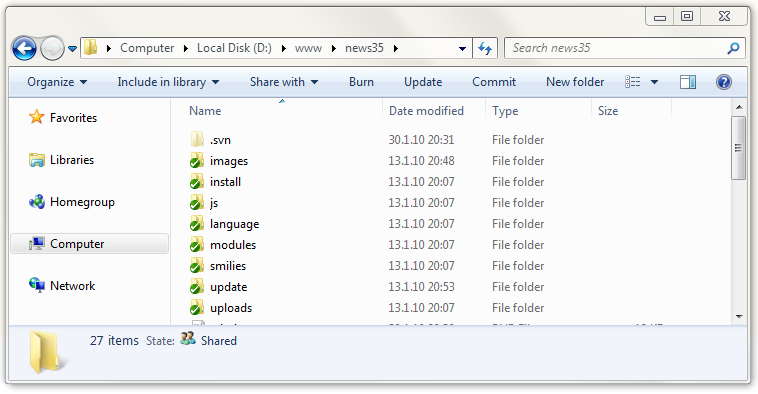
If you've ever wanted to add custom buttons to the Windows Vista/7 explorer toolbar, here's how.
We're going to add 2 buttons to the toolbar that will allow us to use Tortoise SVN, specifically the Update and Commit functions.
Open regedit and navigate to this key
HKEY_LOCAL_MACHINE\SOFTWARE\Microsoft\Windows\CurrentVersion\Explorer\FolderTypes\{5c4f28b5-f869-4e84-8e60-f11db97c5cc7}
You'll need to take ownership of this key before you'll be able to edit it.
Right click on the key > Permissions > Advanced > Owner tab > Select your username > tick the box 'Replace owner on subcontainers and objects' > hit Apply - OK > Select your username from the list and give it full control > Hit OK
Now below that key you want to create the following structure

Download this file to create all the necessary keys or use the code below.
Windows Registry Editor Version 5.00

[HKEY_LOCAL_MACHINE\SOFTWARE\Microsoft\Windows\CurrentVersion\Explorer\FolderTypes\{5c4f28b5-f869-4e84-8e60-f11db97c5cc7}]
"CanonicalName"="Generic"
"PerceivedType"=dword:00000000
"Theme"="default"
"MostRelevant"="prop:System.Kind;System.DateModified;System.StructuredQuery.Virtual.Type;System.Size;System.ItemNameDisplay;System.ItemFolderPathDisplay;System.ItemAuthor;System.Keywords"
"LayoutType"=dword:00000001

[HKEY_LOCAL_MACHINE\SOFTWARE\Microsoft\Windows\CurrentVersion\Explorer\FolderTypes\{5c4f28b5-f869-4e84-8e60-f11db97c5cc7}\Modifiers]
"Library"="{5f4eab9a-6833-4f61-899d-31cf46979d49}"
"LibraryFolder"="{da3f6866-35fe-4229-821a-26553a67fc18}"
"SearchResults"="{7fde1a1e-8b31-49a5-93b8-6be14cfa4943}"

[HKEY_LOCAL_MACHINE\SOFTWARE\Microsoft\Windows\CurrentVersion\Explorer\FolderTypes\{5c4f28b5-f869-4e84-8e60-f11db97c5cc7}\TasksItemsSelected]

[HKEY_LOCAL_MACHINE\SOFTWARE\Microsoft\Windows\CurrentVersion\Explorer\FolderTypes\{5c4f28b5-f869-4e84-8e60-f11db97c5cc7}\TasksItemsSelected\0]

[HKEY_LOCAL_MACHINE\SOFTWARE\Microsoft\Windows\CurrentVersion\Explorer\FolderTypes\{5c4f28b5-f869-4e84-8e60-f11db97c5cc7}\TasksItemsSelected\0\{C3B93FE3-9821-4c29-A189-95A9A00479E5}]
"InfoTip"="Update Repository"
"Title"="Update"

[HKEY_LOCAL_MACHINE\SOFTWARE\Microsoft\Windows\CurrentVersion\Explorer\FolderTypes\{5c4f28b5-f869-4e84-8e60-f11db97c5cc7}\TasksItemsSelected\0\{C3B93FE3-9821-4c29-A189-95A9A00479E5}\shell]

[HKEY_LOCAL_MACHINE\SOFTWARE\Microsoft\Windows\CurrentVersion\Explorer\FolderTypes\{5c4f28b5-f869-4e84-8e60-f11db97c5cc7}\TasksItemsSelected\0\{C3B93FE3-9821-4c29-A189-95A9A00479E5}\shell\InvokeTask]

[HKEY_LOCAL_MACHINE\SOFTWARE\Microsoft\Windows\CurrentVersion\Explorer\FolderTypes\{5c4f28b5-f869-4e84-8e60-f11db97c5cc7}\TasksItemsSelected\0\{C3B93FE3-9821-4c29-A189-95A9A00479E5}\shell\InvokeTask\command]
@="\"C:\\Program Files\\TortoiseSVN\\bin\\TortoiseProc.exe\" \"/command:update /path:%*\""

[HKEY_LOCAL_MACHINE\SOFTWARE\Microsoft\Windows\CurrentVersion\Explorer\FolderTypes\{5c4f28b5-f869-4e84-8e60-f11db97c5cc7}\TasksItemsSelected\1]

[HKEY_LOCAL_MACHINE\SOFTWARE\Microsoft\Windows\CurrentVersion\Explorer\FolderTypes\{5c4f28b5-f869-4e84-8e60-f11db97c5cc7}\TasksItemsSelected\1\{B8000CD6-3C35-49ad-B44F-7FE987951BE2}]
"InfoTip"="Subversion Commit"
"Title"="Commit"

[HKEY_LOCAL_MACHINE\SOFTWARE\Microsoft\Windows\CurrentVersion\Explorer\FolderTypes\{5c4f28b5-f869-4e84-8e60-f11db97c5cc7}\TasksItemsSelected\1\{B8000CD6-3C35-49ad-B44F-7FE987951BE2}\shell]

[HKEY_LOCAL_MACHINE\SOFTWARE\Microsoft\Windows\CurrentVersion\Explorer\FolderTypes\{5c4f28b5-f869-4e84-8e60-f11db97c5cc7}\TasksItemsSelected\1\{B8000CD6-3C35-49ad-B44F-7FE987951BE2}\shell\InvokeTask]

[HKEY_LOCAL_MACHINE\SOFTWARE\Microsoft\Windows\CurrentVersion\Explorer\FolderTypes\{5c4f28b5-f869-4e84-8e60-f11db97c5cc7}\TasksItemsSelected\1\{B8000CD6-3C35-49ad-B44F-7FE987951BE2}\shell\InvokeTask\command]
@="\"C:\\Program Files\\TortoiseSVN\\bin\\TortoiseProc.exe\" \"/command:commit /path:%*\""

[HKEY_LOCAL_MACHINE\SOFTWARE\Microsoft\Windows\CurrentVersion\Explorer\FolderTypes\{5c4f28b5-f869-4e84-8e60-f11db97c5cc7}\TasksNoItemsSelected]

[HKEY_LOCAL_MACHINE\SOFTWARE\Microsoft\Windows\CurrentVersion\Explorer\FolderTypes\{5c4f28b5-f869-4e84-8e60-f11db97c5cc7}\TasksNoItemsSelected\0]

[HKEY_LOCAL_MACHINE\SOFTWARE\Microsoft\Windows\CurrentVersion\Explorer\FolderTypes\{5c4f28b5-f869-4e84-8e60-f11db97c5cc7}\TasksNoItemsSelected\0\{6A56F6CC-1321-49b8-B7AB-94BE35683404}]
"InfoTip"="Update Repository"
"Title"="Update"

[HKEY_LOCAL_MACHINE\SOFTWARE\Microsoft\Windows\CurrentVersion\Explorer\FolderTypes\{5c4f28b5-f869-4e84-8e60-f11db97c5cc7}\TasksNoItemsSelected\0\{6A56F6CC-1321-49b8-B7AB-94BE35683404}\shell]

[HKEY_LOCAL_MACHINE\SOFTWARE\Microsoft\Windows\CurrentVersion\Explorer\FolderTypes\{5c4f28b5-f869-4e84-8e60-f11db97c5cc7}\TasksNoItemsSelected\0\{6A56F6CC-1321-49b8-B7AB-94BE35683404}\shell\InvokeTask]

[HKEY_LOCAL_MACHINE\SOFTWARE\Microsoft\Windows\CurrentVersion\Explorer\FolderTypes\{5c4f28b5-f869-4e84-8e60-f11db97c5cc7}\TasksNoItemsSelected\0\{6A56F6CC-1321-49b8-B7AB-94BE35683404}\shell\InvokeTask\command]
@="\"C:\\Program Files\\TortoiseSVN\\bin\\TortoiseProc.exe\" \"/command:update /path:%*\""

[HKEY_LOCAL_MACHINE\SOFTWARE\Microsoft\Windows\CurrentVersion\Explorer\FolderTypes\{5c4f28b5-f869-4e84-8e60-f11db97c5cc7}\TasksNoItemsSelected\1]

[HKEY_LOCAL_MACHINE\SOFTWARE\Microsoft\Windows\CurrentVersion\Explorer\FolderTypes\{5c4f28b5-f869-4e84-8e60-f11db97c5cc7}\TasksNoItemsSelected\1\{37070D52-CFA5-4054-A5BF-BE21C094C4AC}]
"InfoTip"="Subversion Commit"
"Title"="Commit"

[HKEY_LOCAL_MACHINE\SOFTWARE\Microsoft\Windows\CurrentVersion\Explorer\FolderTypes\{5c4f28b5-f869-4e84-8e60-f11db97c5cc7}\TasksNoItemsSelected\1\{37070D52-CFA5-4054-A5BF-BE21C094C4AC}\shell]

[HKEY_LOCAL_MACHINE\SOFTWARE\Microsoft\Windows\CurrentVersion\Explorer\FolderTypes\{5c4f28b5-f869-4e84-8e60-f11db97c5cc7}\TasksNoItemsSelected\1\{37070D52-CFA5-4054-A5BF-BE21C094C4AC}\shell\InvokeTask]

[HKEY_LOCAL_MACHINE\SOFTWARE\Microsoft\Windows\CurrentVersion\Explorer\FolderTypes\{5c4f28b5-f869-4e84-8e60-f11db97c5cc7}\TasksNoItemsSelected\1\{37070D52-CFA5-4054-A5BF-BE21C094C4AC}\shell\InvokeTask\command]
@="\"C:\\Program Files\\TortoiseSVN\\bin\\TortoiseProc.exe\" \"/command:commit /path:%*\""

[HKEY_LOCAL_MACHINE\SOFTWARE\Microsoft\Windows\CurrentVersion\Explorer\FolderTypes\{5c4f28b5-f869-4e84-8e60-f11db97c5cc7}\TopViews]

[HKEY_LOCAL_MACHINE\SOFTWARE\Microsoft\Windows\CurrentVersion\Explorer\FolderTypes\{5c4f28b5-f869-4e84-8e60-f11db97c5cc7}\TopViews\{00000000-0000-0000-0000-000000000000}]
"Name"="NoName"
"Order"=dword:00000000
"ColumnList"="prop:0(34)System.ItemNameDisplay;0System.DateModified;0System.ItemTypeText;0System.Size;1System.DateCreated;1System.Author;1System.Keywords;1System.Title"
"LogicalViewMode"=dword:00000001
For reference see these links
http://www.experts-exchange.com/articles/OS/Microsoft_Operating_Systems/Windows/Windows_7/Add-a-Delete-Button-to-the-Windows-7-Explorer-Toolbar.html

http://www.experts-exchange.com/articles/Programming/System/Windows__Programming/Add-a-Custom-Command-Button-to-the-Windows-7-Explorer-Toolbar.html


 Latest